Healthcare LLM Use Case
Checking CPT and Taxonomy Code Mismatch
Attachments: data.txt
Sections
- Taxonomy and CPT Code
- Issue We Are Trying To Solve
- LLM Solution
- Automating the Process
- Testing the LLM Classification
- Fleshing Out the Project
Taxonomy and CPT Code
This article is a simple sketch of a potential LLM use case in healthcare.
Healthcare providers often come with a taxonomy code. Here is an example of one such taxonomy code:
207Q00000X - Family Medicine
The code itself is 207Q00000X, which stands for family medicine. You can find a description of this taxonomy code on this webpage. There are more nuances with taxonomy codes that I will not be going through in this article.
Medical procedures also often come with a code, known as the CPT code. Again, here is an example of one such CPT code:
99214 - Established patient office or other outpatient visit, 30-39 minutes
Similarly, the code itself is 99214, which stands for a 30-39 minute office visit. A description of the code can be found on this webpage.
Issue We Are Trying To Solve
A pair of CPT and taxonomy codes represents an event during which a healthcare provider with the taxonomy code performed the medical procedure with the CPT code. A common question is whether there is a potential mismatch between the taxonomy code and the medical procedure.
For example, if the taxonomy code is 122300000X for dentist while the corresponding CPT code is 33120 for surgical removal of a heart tumor, we might be wondering if something went wrong with this data point. This mismatch could happen due to numerous reasons. Here are some of them:
-
Outdated information. For example, if the provider has not updated their taxonomy code for a long time.
-
Errors in the data. For example, if a table join was not done correctly.
-
Quirks due to the way medical services are performed and recorded. For example, the provider could be assisting a more senior doctor who has the correct taxonomy code.
-
It could be a billing error. For example, the dental office accidentally putting in the wrong CPT code and charging a much higher rate. Or the provider not understanding that they are not licensed to charge for the procedure.
Usually, potential mismatches are found by manual human labor. It is easy for a human to spot mismatched taxonomy and CPT codes at a glance. For the more complicated cases, humans can perform an internet search and make a judgment call. However, it is hard to automate a solution to this problem.
LLM Solution
Large language models (LLMs) are in a unique position for this problem. They can be automated to help provide an answer to this nebulous question of whether there is a mismatch. If the model has access to the internet, they can do a web search to help formulate their answer. This process mimics how a human would search the internet and make a judgment call on whether there is a mismatch.
The way I like to prompt the LLM is to make the output answer as specific as possible. This is an example of how I would do it in ChatGPT 5.1 for our previous example of a provider with taxonomy code 207Q00000X (family medicine) billing CPT code 99214 (office visit).
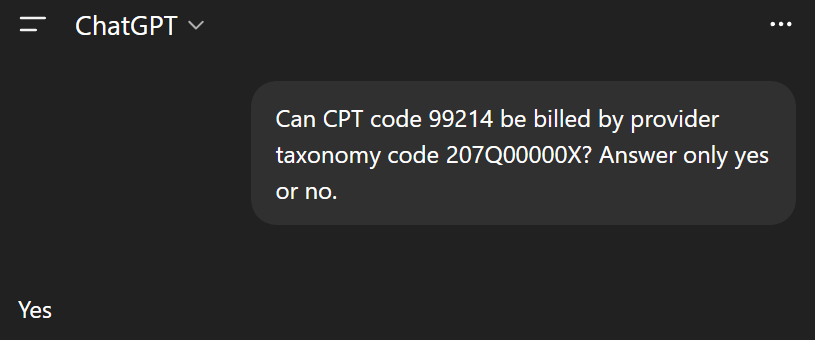
The answer is what we would expect: of course a family medicine doctor can bill office visits. Let’s try this with the obvious mismatch we mentioned earlier: taxonomy code 122300000X (dentist) and CPT code 33120 (heart tumor surgery).
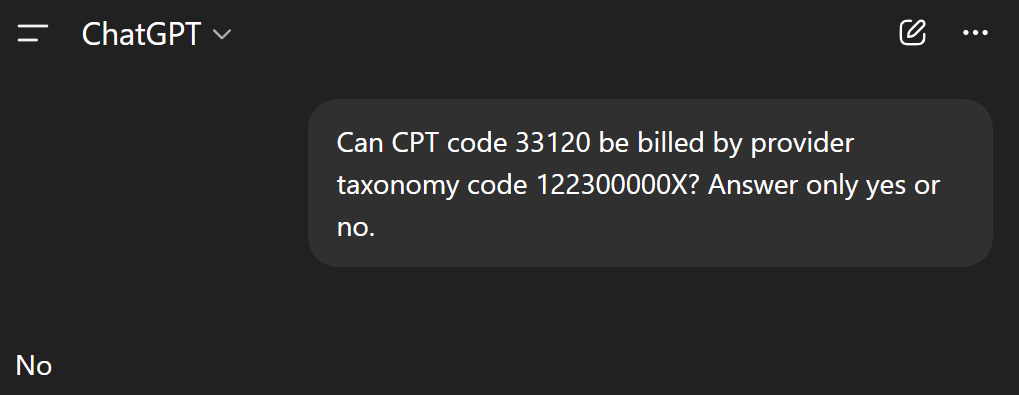
Once again, the answer is what we would expect. We can easily ask the LLM to produce an explanation of why it gave that answer as well.
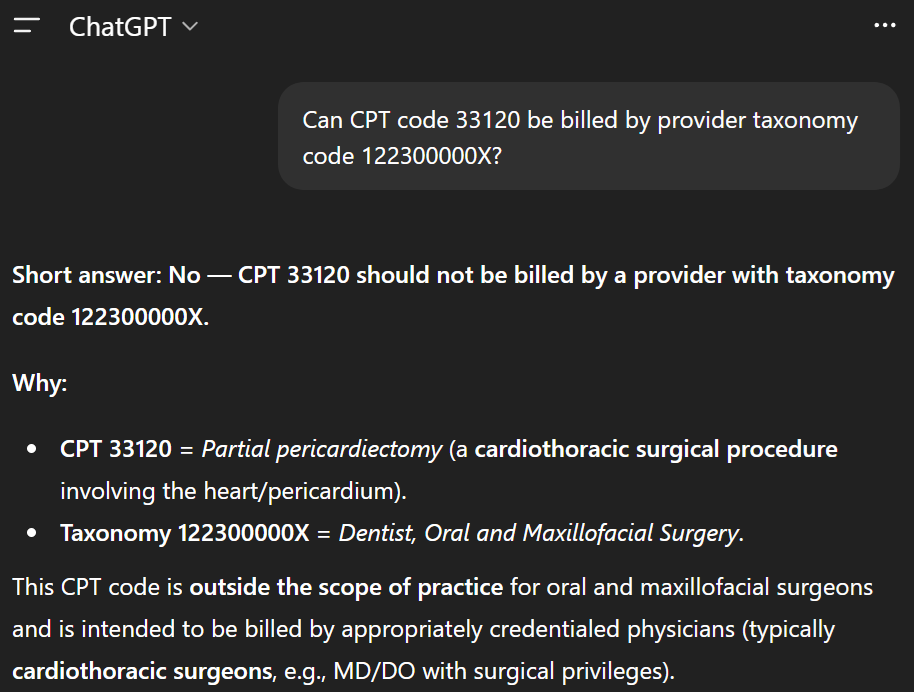
LLMs do not produce these explanations with any level of reliability. You can easily get wrong or hallucinated explanations. If I were to show these explanations to the user, I would make it very clear that these are only suggestions, are produced by an LLM, and could be wrong.
Unfortunately, the same is true for the yes or no answers generated earlier.
Automating the Process
We can easily automate this prompting process for a large list of CPT and taxonomy code combinations. Google Gemini has a free tier with API access, which is what I will be using to demonstrate this. Below is an example.
 1import pandas as pd
 2
 3# pip install google-genai
 4from google import genai
 5
 6client = genai.Client(api_key='YOUR API KEY HERE')
 7
 8df_data = pd.read_csv('data.txt', dtype='string', skipinitialspace=True)
 9
10answer = []
11
12for index, row in df_data.iterrows():
13
14    cpt = row['cpt']
15    taxonomy = row['taxonomy']
16    prompt = f'Can CPT code {cpt} be billed by provider taxonomy code {taxonomy}? Answer only yes or no.'
17
18    response = client.models.generate_content(
19        model="gemini-2.5-flash", contents=prompt
20    )
21
22    answer.append(response.text[0])
23
24df_answer = pd.DataFrame(answer, columns=['answer'])
25output = pd.concat([df_data, df_answer], axis=1)
The CSV file data.txt can be found in the attachment section at the top of this article. This is a small set of mock data. However, we can load a large text file containing many such pairs instead, and the code would still work.
Notice that I am prompting the LLM one CPT-taxonomy code pair at a time in a for loop. Asking one by one is much better for accuracy than trying to get the LLM to give answers for an entire list. LLMs do not handle long contexts or complex, multi-faceted prompts well at all.
Testing the LLM Classification
One advantage of restricting the LLM to highly specific yes or no answers is that we can compile a list of CPT and taxonomy code pairs with known labels and test the accuracy of the system as if it is a classification model.
For example, the output from the code in the previous section, using Gemini 2.5 Flash is quite atrocious! The model said yes to everything, including the mismatched pairs that we have already discussed in the previous sections.
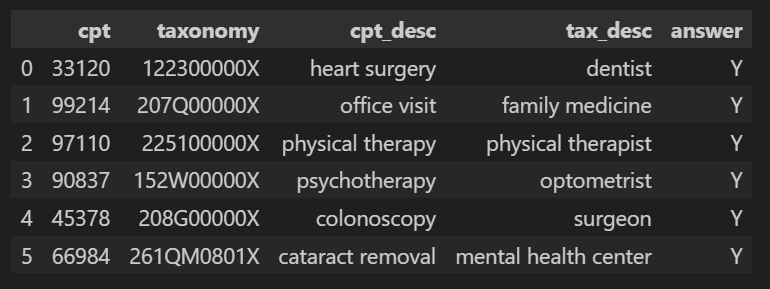
After examining the model’s explanation for one of the mismatched pair (heart surgey and dentist) to see what has gone wrong, this appears to be what is causing the problem.
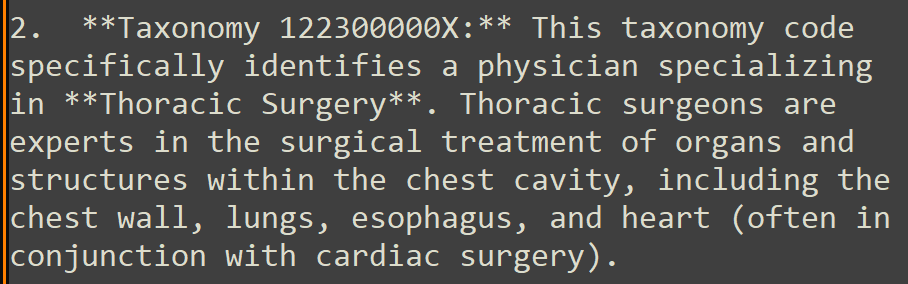
The taxonomy code 122300000X stands for dentists, but the model wrongly claims that it is for thoracic surgeons, which was why it thought the answer for this pair should be “yes”. There are two possible issues with Gemini 2.5 Flash that might have caused this:
-
It is a small, less powerful model.
-
The free-tier API does not allow the model to do web searches, and its training data is inadequate for our use case.
The answers were perfect after switching over to a Gemini 3 model in “thinking mode” that does web searches.

However, Gemini 3 started adding explanations after answering “yes” or “no”. If you plan to use the code shown in the previous section with this model, you might need to expand the simple prompt to prevent this from happening. This simple modification worked for me:
Can CPT code {cpt} be billed by provider taxonomy code {taxonomy}? Answer only yes or no. Do not add any explanation.
Fleshing Out the Project
So far, we have been just interacting with a barebones LLM. However, LLMs are very barebones and require a lot of supporting software and infrastructure. Here are two things we can potentially add to our basic setup.
-
We should cache the answers and explanations so that for future lists, we can save on LLM costs by reusing past output.
-
Collect user feedback by allowing users to mark which entries are potentially wrong. Allow users to suggest the correct answer.